
We've put everything you need to work with Danfoss food retail controls in supermarket refrigeration applications, in one place. Find product literature links, how-to videos, FAQs, and more - it's all right here...
Browse our video library
Support on the go - hosted by our Food Retail Technical Support experts, & highlighting best practices for utilizing Danfoss food retail controls. Enjoy tips and tricks you won't find in any manual!
Tune in Now

Download the Supermarket troubleshooting guide for a quick reference for solutions to the most common troubleshooting questions. Updated October 2023.
Download guide
Find literature links to setup, installation, and other quick reference guides organized by product type below:
Parts list for supermarket electronics
Troubleshooting guide for supermarket electronics
AK-CC 55 Compatibility
AK-CC 55 Software Upgrade Process
AK-CC 55 Single Coil (084B4082 and 084B4083)
AK-CC 55 Single Coil Installation Guide
AK-CC 55 Multi Coil (084B4084)
AK-CC 55 Multi Coil User Guide
AK-CC 55 Multi Coil Installation Guide
AK-CC 55 Compact (084B4081)
AK-CC 55 Compact User Guide
AK-CC 55 Compact Installation Guide
Installing AK-CC 550A with the new v2.0 firmware
AK-CC 550A Factory checkout
AK-CC 550A Troubleshooting guidelines
AKCC 550A Pocket guide
AK-CC 550A to AK-SM 800 Configuration
AK-CC 550A hot gas defrost programming guide
AK-CC 550A - prevent high temps during shutdown programming guide
AK-CC 750 Controller replacement
AK-CC 750 IO Layout
AK-CC 750 to AK-SM 800 Configuration
AK-PC Sensor Abbreviations
AK-PC 782 Testing and Startup Guide
AK-PC 782B Installation Guide
AK-PC IDCM Programming Guide
AK-PC Heat Reclaim Strategy
Remote Connection to AK-PC Pack Controller
AK-SM 800A User Guide
AK-SM 800A Installation Guide
AK-SM 800A Quick Reference Guide
AK-SC 255/SM 800 to AK-SM 800A Conversion Application Guide
AK-SM 800A Software Upgrade Process
AK-SM Legacy Equipment Replacement Guide
Configuration of Modbus on AK-SM 800A
Communication Setup between AK-SM 800A and Danfoss VFD
AK-SM 800 System manager quick setup
AK-SM 800 IO Offline Troubleshooting
AK-SC 255 to AK-SM 800 Database Conversion
AK-SM 800 digital scroll programming guide
AK-SM direct connect via Cat5 programming guide
AK-SM 800 quick reference guide
AK-SM 800 spec-feature matrix
AK-SM 800AL alarm logger user guide
AK-SM USB program download guide
Circuit setup with suction EEPR and solenoid valve
RMT database save for AK 355 and AK-SM 800 guide
Programming a box door refrigeration and fan restart (IO control)
Working with holiday date programming
AK-SC 255 Advanced Defrost
AK2-SC 255 Authorization code levels
AK-SC 255 PC direct connect using Cat5 patch cable
AK-SC 255 Software update instructions
AK-SC 255 History functions
DGS User Guide
DGS Strobe and Horn Installation Guide
EKE User Guide
EKE Installation Guide
How to connect multiple EKE 1C to MMIGRS
No. If controller is defective, full unit should be replaced.
No, only an oscilloscope will supply proper information showing the quality of the signal on the comm loop.
No, system managers can only communicate to same series type. For example, AK-SM 800A cannot communicate with AK-SM800.
AK-XM 208C is only compatible with AK-SM 800A series running software v4.0 or newer.
No, but a separate 3rd party filter, which performs the same function, can be purchased from On Filter.
These are files that allow the system manager to properly display data from generic devices types such as pack controllers, case controllers, and 3rd party devices. Each device type has a dedicated file, and each file type is used with a specific model of system manager (edf = AK-SC 255, ed3 = AK-SM 800, epk = AK-SM 800A).
Perform a rescan at the system manager, which will force the controller to scan for the offline devices. If that doesn’t solve the problem, perform secondary checks, including proper EOL termination of the loop and power at the offline devices.
Press “Forgot Credentials” from the login screen, and then “Reset Password”. This will give you a MAC Address and code. Then, call Danfoss monitoring at 1-866-513-0581 with these details to obtain temporary login credentials.
No, only by loading database into a physical unit.
Part number 080Z4029 is the retrofit version of the AK-SM 880, with native LONTP78 communication. Additional part numbers can be found here.
Notes:
Watch our video for an introduction to AK-CC 210 functionality.
Flashing icons indicate an alarm condition. For details on what the alarm indicates, press the top button of the case controller for the alarm code. Additional details can be found on the KoolCode app or in paperwork included with the case controller.
Think of parameter r12 as the main switch for case control, so it needs to be set to the “On” position before operation will begin (when set to “Off,” alarm code A45 will be active).
This alarm indicates that the suction transducer is reading outside of the normal range. Wiring and programming of the transducer should be checked.
The case controller will continue to display this during the pulldown phase until the case has reached its cut-in temperature.
Press and hold the top button for 5 seconds or until r01 is displayed. Next, use the top button to navigate to “o03.” Then, press the “Set” button and change address from 000 to desired address using top button. When complete, press “Set” button again.
Yes, however for the AK-XM 103A (4AI/4AO) module, firmware version v2.101 or higher must exist in the controller.
Direct connect can either take place through a 9-pin to RJ45 connector, or via cat5 cable using the process found here.
You will need to contact Danfoss tech support to obtain the original license, which can be re-entered into the Configuration->Licensing screen of the controller. Note a lost license does not result in lost control, only loss of ability to make programming changes.
This guide describes step by step how to quickly set up the DGS Gas Detector.
Download the complete guide
The sensor calibration certificate is normally included in the installation pack.
If you lose this certificate, you can request it from your sales representative by providing:
Code number, Serial Number and Manufactured date printed on the sensor head.
When the DGS is provided, the sensor is already calibrated from the factory side.
The sensor has then to be re-calibrated depending on the gas used in the application.
Following the period recorded in the sensor head:
Yes, when the calibration expires there are 2 possible options:
In this video, we will see how to gain calibrate the DGS.
In this video, we will see how to make zero calibration in the DGS.
Typical sensor lifespan:
No, the DGS for propane can only be used in a non-ATEX zone.
Desktop based access:
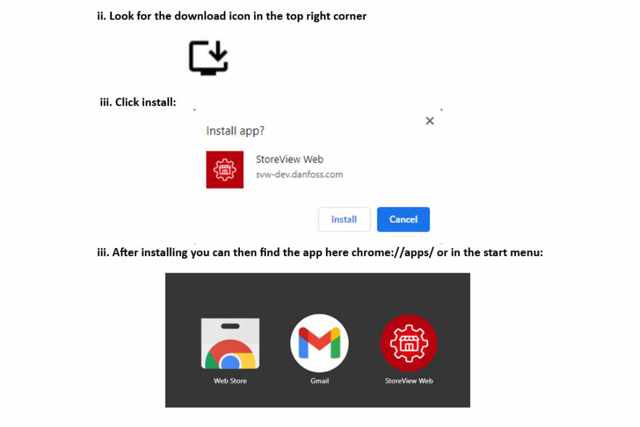
A desktop application will be available for download very soon, in the meantime you can save the app for offline use in your browser, see instructions below.
No, you log in with the user profile you have created for your AK-SM 800A, along with the IP address of the unit. Note: It is only possible to access Storeview Web if you have access to a connected AK-SM 800A or AK-SM 800.
Most modern browsers are supported, e.g. Microsoft Edge, Google Chrome, Firefox and Safari. Internet Explorer is not supported as it has reached end-of-life. We continuously update SvW and actively maintain support for the last 6 months of updates of the browsers.
Note: Edge and Chrome are both case on the Chromium browser engine, which from version 94 and above restricts how you can access private systems. See x) Common issues when connecting, if you experience problems.
Note: We also offer PWA versions of Storeview Web, see the x) How to save SvW for offline use
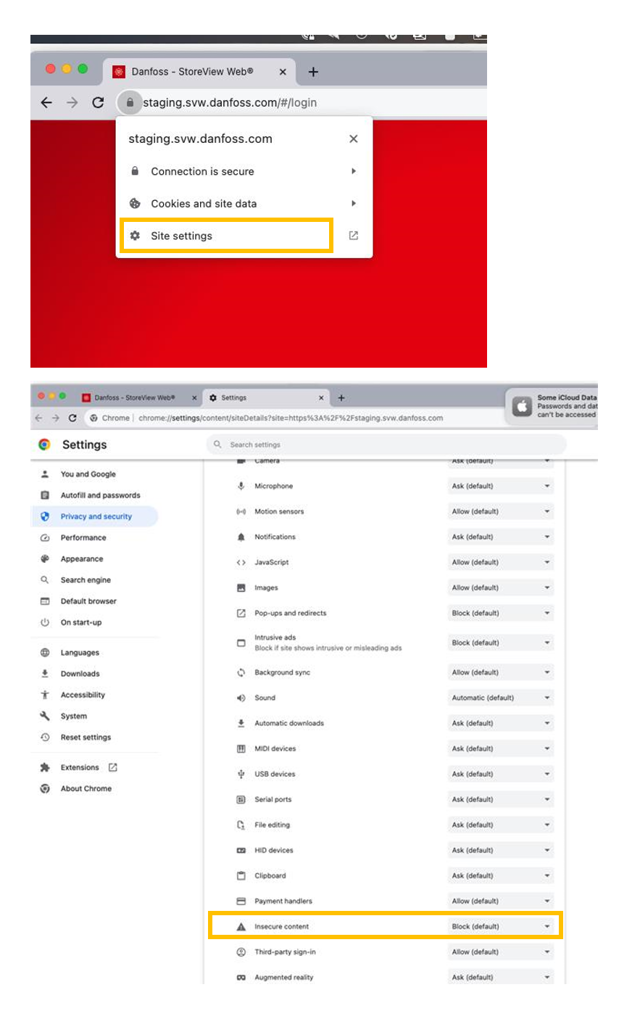
Many browsers are blocking access to HTTP sites, in Chrome you manually change the settings by following these step and “allow” for insecure content. As an alternative we recommend to use the Desktop version of Storeview Web.
For now, SvW Desktop only supports Microsoft Windows version 7, 10 and 11. We are working on adding support for MacOS and certain Linux distributions in addition to docker support.Note: We also offer PWA versions of Storeview Web, see the x) How to save SvW for offline use
AK-SM800 from version G08.045 and AK-SM800A all versions.
See x) Common issues when connecting
a. I have trouble connecting to my HTTPS enabled system-managerYou might see a warning when you try and connect to a HTTPS enabled system, mentioning that SvW could not reach the target system and that you might need to manually trust the certificate of the system. This warning can also be shown if the target system is offline or unavailable.
The AK-SM800A is loaded with a self-signed certificate from the factory, self-signed certificates are untrusted and as such requires manual validation by the end-user. The AK-SM800A user guide explains how to install a trusted certificate which allows you to skip this warning. Remember that if you are using a multi-system site, all certificates needs to be trusted. If that is the case, you will see a yellow warning triangle when logged in, which will prompt you to accept all certificates for all units in the system.
b. I have trouble connecting to my HTTP enabled system-managerThere are special considerations to be made when using a HTTP enabled system. HTTP connections are slowly being deprecated in favor of HTTPS which means that many browsers and operating system are slowly increasing the restrictions placed on those systems. This can impact SvW’s ability to communicate with the system-manager.
Most importantly a security mechanism called Cross-Origin Resource Sharing, or CORS, has recently been introduced to Chromium based browser from version 94 and above (See link for more details). CORS is a mechanism that’s intended to protect the end-user from malicious websites who would have been able to interact with private systems (I.e. your home router) using a cross-origin request. In other words, CORS prevents a public system, like svw.danfoss.com, from interacting with private systems like your system manager.
CORS takes effect when any public system, loaded over insecure HTTP, tries to interact with a system on a private network. Private networks are defined as any IP’s in the following subnets 10.0.0.0/8, 172.16.0.0/12 or 192.168.0.0/16.
This means that you will likely experience an inability to connect to an HTTP configured AK-SM800 system if your browser is either Edge or Chrome above version 94.
If you do experience problems, then we advise you to download and use the desktop version instead, or to use Firefox which is not yet affected, or to contact your Corporate IT department who can disable these security policies using a group policy.
c. I have other problems connecting to my systemPlease reach out to your local representative and include details about your setup including; Browser Type and Version, IP settings of target system, Use of VPN if applicable, etc., please also include a system-report from the target system if possible.
d. Important differences between the different HW and FW versions:
Yes you can, but it depends entirely on the configuration and type of VPN or Proxy. Most importantly, your device should be able to access the target device. You can check if you have access by going to the domain address or IP of the target device. If the browser does not timeout, but loads a page then you can connect using SvW. If the browser times out or if no page are shown, then you will likely not be able to use SvW.
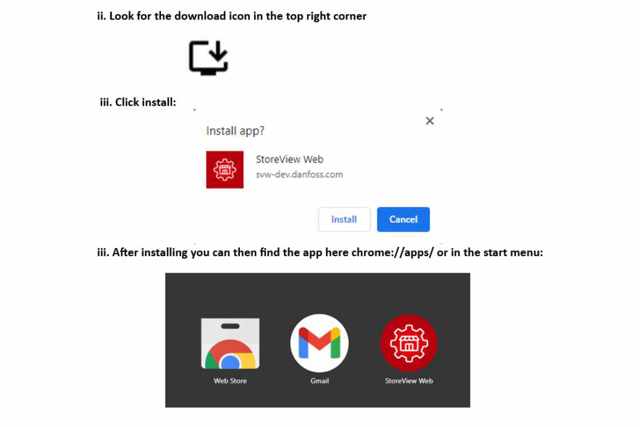
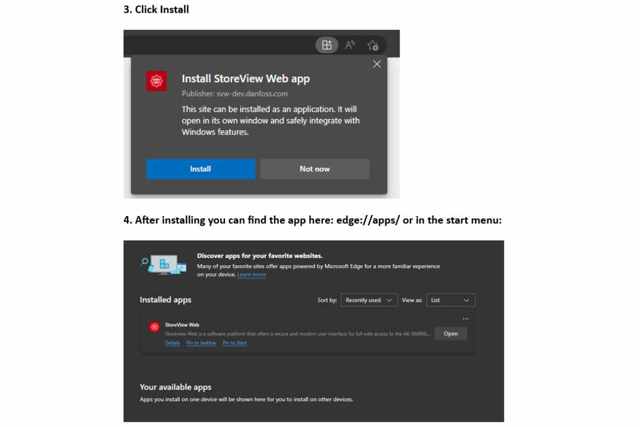
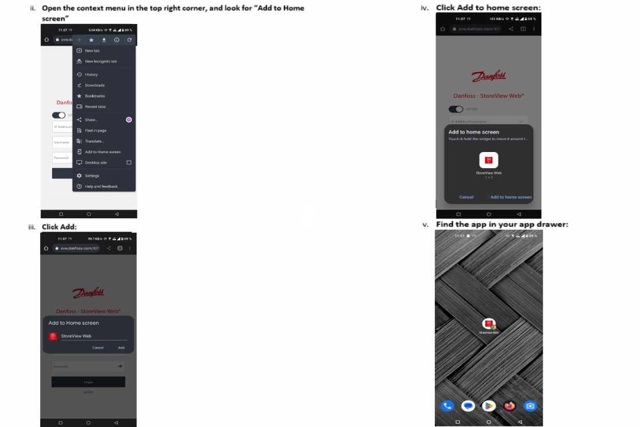
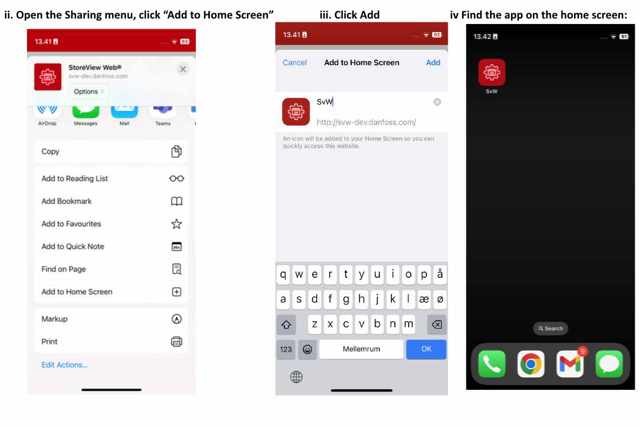
SvW can be installed as an offline PWA app on most devices. The feature is dependent on you OS and Browser type and version. If you don’t see the options mentioned below, then your device might not be supported. Note: Installing a PWA application is only possible on the HTTPS version of SvW. Most browsers do not allow HTTP install. Once the application is installed, you can switch to HTTP mode within the application.
This is not supported by Apple
Please read our data Privacy Policy.
Phone: 1(888)DANFOSS | 1(888) 326-3677
Email: [email protected]
Join us on Teams